How to Track AI Traffic in Google Analytics 4 (ChatGPT, Perplexity, Gemini, Claude)
AI assistants now send measurable traffic to your site, but GA4 buries it inside Referral and Direct. This guide shows the exact regex, segment, and custom channel group to isolate it in about 15 minutes.
AI traffic in GA4 is the slice of website sessions that originate from an AI assistant such as ChatGPT, Perplexity, Gemini, Claude, or Copilot. By default, Google Analytics 4 puts these visits into Referral or Direct, so they are invisible at the channel level. To track them, you create a session source regex and apply it as both a segment and a custom channel group.
This guide walks through the exact setup. It takes about 15 minutes.
Why this matters in 2026
Pew Research found that users on Google pages with an AI summary clicked traditional search results less often than users on pages without one, and clicked links inside the AI summary itself far less often. At the same time, ChatGPT, Perplexity, and other assistants are sending real referral traffic to many sites, even if that traffic is still a small share of total sessions for most B2B teams.
If that traffic stays buried in your Referral report, three things go wrong:
- You can't measure conversion from AI surfaces.
- You can't justify investment in AI visibility work.
- You miss the leading indicator that buyers are finding you through answer engines.
What counts as AI traffic
Two distinct flows. You can measure the first directly. The second you can only approximate.
1. Referral clicks from AI surfaces. A user clicks a citation or link inside an AI answer and lands on your site. GA4 sees this as a referrer like chatgpt.com or perplexity.ai.
2. Behavior-influenced visits. A user reads about your brand inside the AI answer, then types your URL or searches your name. These show up as Direct or Branded Organic. They are real demand, but GA4 attributes them elsewhere.
This guide focuses on the first flow. The second requires a brand-tracking layer that watches how AI assistants describe you even when no click occurs, which is what Markiqo measures.
The session source regex
This is the working pattern. Paste it as-is.
.*(chatgpt\.com|chat\.openai\.com|openai\.com|perplexity\.ai|perplexity\.com|gemini\.google\.com|bard\.google\.com|copilot\.microsoft\.com|edgeservices\.bing\.com|claude\.ai|anthropic\.com|you\.com|meta\.ai|poe\.com|phind\.com|kagi\.com|grok\.com|x\.ai|chat\.deepseek\.com|chat\.mistral\.ai).*
The escaped dots (chatgpt\.com) prevent false matches, and the .* wrapper matters because GA4 regex matching is full-match by default. Add new sources as the landscape shifts. Product assistants such as Apple Intelligence and Amazon Rufus may become useful additions once they start sending identifiable web traffic.
Step 1: Create an AI traffic segment
Segments are the fastest way to confirm AI traffic exists in your property before you change global settings. When you click + next to Segments, GA4 first asks which type of segment you want. Pick Session segment, since AI traffic is a session-level attribute.
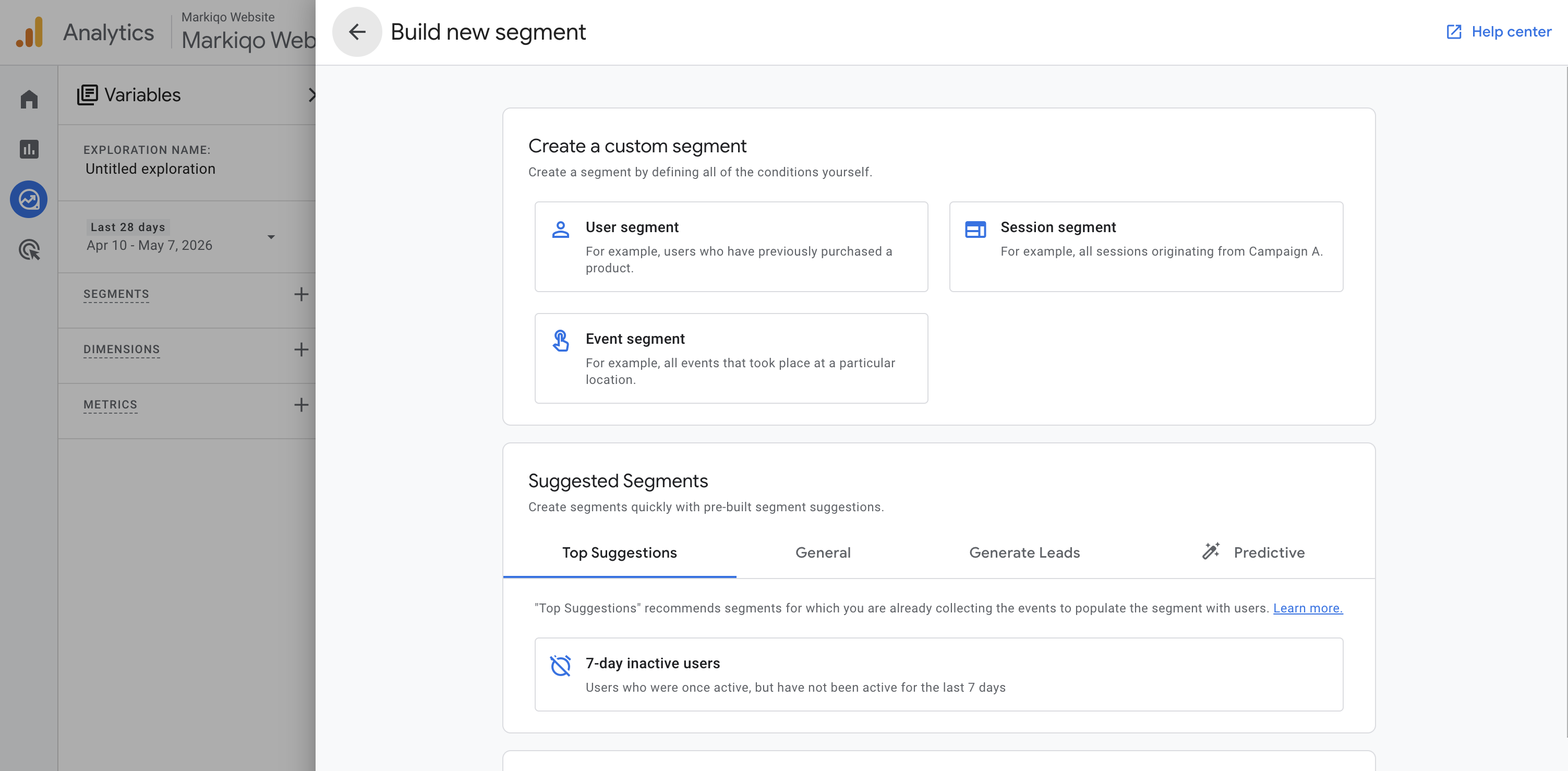
The full setup is five clicks:
- Open GA4 and go to Explore, then choose the Blank template.
- In the left rail, click + next to Segments and pick Session segment.
- Name it
AI Assistants. - Add a condition: choose Session source as the dimension, set the match type to
matches regex, and paste the regex above. - Save and apply.
When you're done, the segment definition should look like this. A single matches regex clause on Session source, with the full pattern visible.
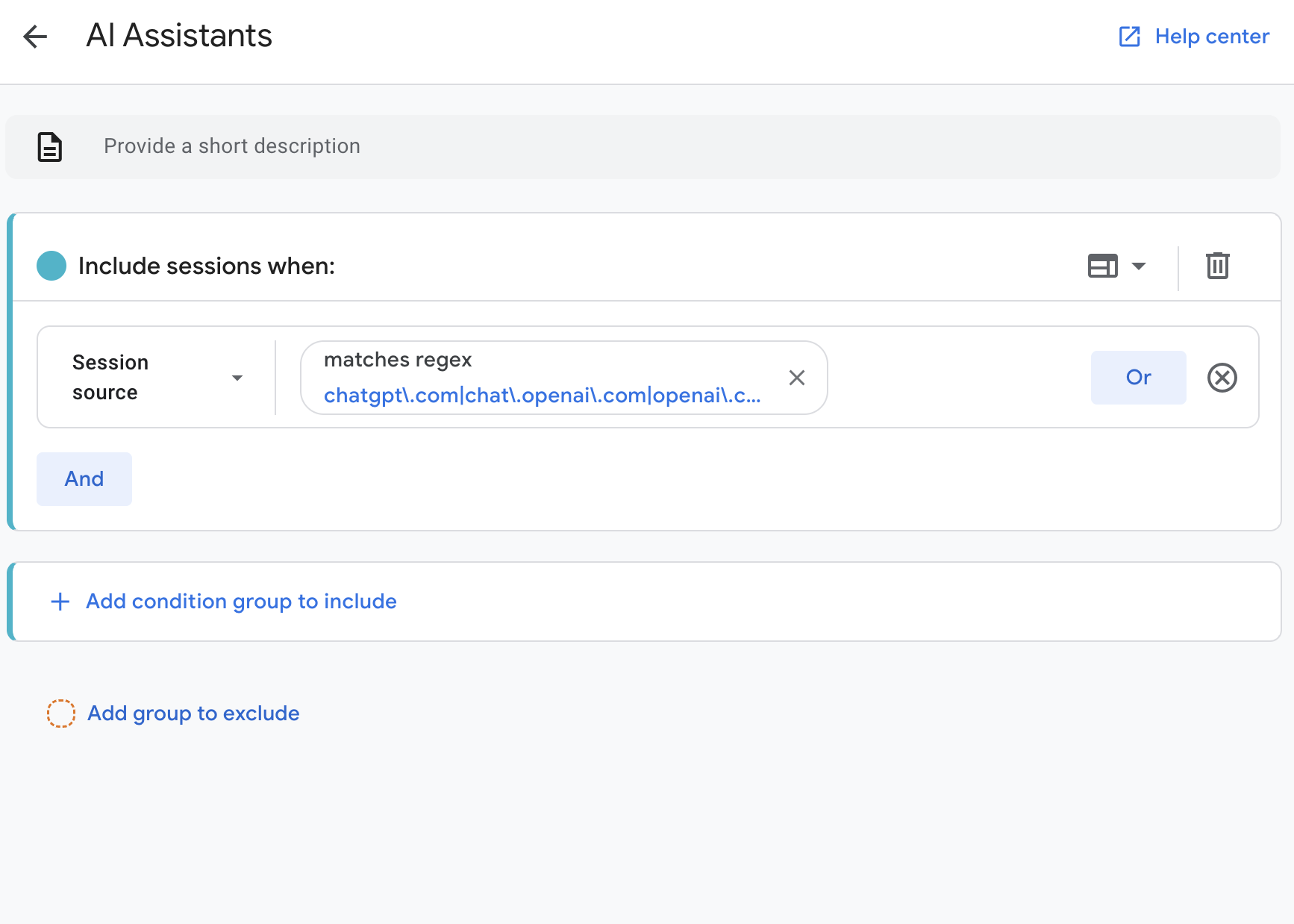
Drag the segment onto the canvas with Sessions, Engaged sessions, Conversions, and Total revenue as values. If your site already has recorded AI referral traffic in the selected date range, it should appear quickly. If you see no data, use the checks in the FAQ below.
Step 2: Create a custom channel group
Segments are great for ad-hoc analysis. To make AI traffic appear in Acquisition reports and other reports that support channel-group dimensions, create a custom channel group. Google's own GA4 documentation now includes an AI assistants custom channel group example, and practitioners share variations on the same setup.
- Go to Admin, then Data display, then Channel groups, then Create new channel group.
- Name it
Channels with AI Assistants. - Click Add new channel and name it
AI Assistants. - Set the rule: Source
matches regex, paste the regex from above. - Drag the AI Assistants channel above Organic Search and Referral. Order matters, because GA4 evaluates rules top-down.
- Save.
To use it: open Reports, then Acquisition, then Traffic acquisition, then click the pencil icon next to the dimension header and switch to your new channel group.
Custom channel groups can be applied retroactively in reports, which is unusual for GA4. Most config changes are forward-looking only.
Step 3: Handle the edge cases
A few realities most tutorials skip.
- Google AI Overviews and AI Mode are bundled into Google Search reporting. You cannot separate them from organic Google search using session source. Search Console reports clicks and impressions from AI Overviews and AI Mode under the regular Web search type, with no dedicated AI Overview filter in standard reporting.
- Bing Copilot in the Edge sidebar sometimes reports
edgeservices.bing.com, sometimesbing.com, sometimes nothing. The regex catches the first. You can addbing\.comif you want to include all Bing-referred traffic in this view, but that will also mix in ordinary Bing search unless you add stricter campaign or landing-page logic. - ChatGPT desktop and mobile apps are inconsistent on referrers. Many web and search-result clicks arrive as
chatgpt.comor includeutm_source=chatgpt.com, but some app and privacy-context clicks still arrive as Direct. There is no clean fix for visits that arrive as Direct with no usable referrer or UTM. Treat the gap as a known measurement floor, not something analytics can fully close. - Perplexity occasionally preserves URL parameters in citations. As a low-yield optional technique, you can place tagged outbound links to your own site on third-party pages Perplexity ingests, such as a Reddit answer or a guest post. If Perplexity later cites that exact URL, the click can carry your UTM parameters through. Caveats: ChatGPT and Gemini canonicalize aggressively and usually drop parameters, so the technique is Perplexity-only in practice, and humans clicking the same third-party link will be misattributed to AI by any UTM-based channel rule. Use sparingly.
- Brand search lift is part of the bigger story. Some AI exposure ends in a later branded search or direct visit, not an immediate click. Track branded organic queries in Google Search Console as a co-indicator.
Step 4: Build the report you'll actually use
Open Explore, then Free form, and configure:
| Setting | Value |
|---|---|
| Segment | AI Assistants |
| Rows | Session source |
| Columns | Device category |
| Values | Sessions, Engaged sessions, Conversions, Total revenue |
| Filter | Session source matches the regex |
Save it and pin it. This single view answers three questions: which AI surfaces send the most traffic, which device categories dominate, and whether those sessions convert. To see what they land on, add Landing page + query string as a second row or use it as the primary row in a duplicate exploration.
For executive reporting, mirror the same query in Looker Studio with GA4 as the data source. Looker uses RegExp Match instead of Matches regex, but the same pattern works.
Benchmarks for AI traffic
Numbers move fast, and there is no universal benchmark yet. Treat these as directional ranges for B2B SaaS sites with active content marketing, not guarantees:
| Metric | Healthy range | Notes |
|---|---|---|
| AI Assistants share of sessions | 1% to 5% | Higher for content-heavy sites |
| Engagement rate vs. Organic Search | +10% to +25% | AI clicks are pre-qualified |
| Conversion rate vs. Organic Search | Comparable | Slightly lower at top-of-funnel |
| Top referring source | ChatGPT, then Perplexity | Gemini and Copilot under-report |
If your numbers are far below this, the problem is rarely tracking. It's that AI assistants aren't citing or recommending you yet. That's a content and brand-presence problem, not an analytics problem.
Frequently asked questions
Is AI traffic in GA4 the same as AI Overviews traffic? No. GA4 captures clicks from AI surfaces that pass a referrer (ChatGPT, Perplexity, Claude, Copilot, and others). AI Overviews inside Google search pass google as the referrer and look identical to organic Google traffic at the session level.
Why don't I see Gemini traffic? Gemini often strips referrers, and many Gemini answers don't include outbound clicks. The regex catches what passes through. Visits with no referrer and no URL parameter will usually remain unattributed in GA4.
Will the custom channel group rewrite history? Custom channel groups can be applied retroactively in GA4 reports. If you set a custom channel group as the primary channel group, that primary-channel definition populates from that point forward.
Should I block AI bots in robots.txt? Only if you have a specific reason. Be precise: OpenAI's citation/search crawler is OAI-SearchBot, while GPTBot is for training. Anthropic separates ClaudeBot, Claude-User, and Claude-SearchBot. Perplexity uses PerplexityBot and Perplexity-User. Google-Extended controls use in some Google AI products, but Google says AI Overviews and AI Mode in Search are controlled through normal Google Search crawling and preview controls. Most B2B sites should leave search and user-fetch crawlers allowed if they want AI assistant visibility.
How often will the regex need updating? Plan to revisit it once a quarter. New AI surfaces appear regularly.
What if my report shows "No data available"? That's the most common first result, and it usually is not a setup problem. New or low-traffic sites genuinely receive no AI referral traffic in a 28-day window yet. Two checks: widen the date range to Last 90 days or Last 12 months, and temporarily swap the segment to All Users to confirm the property is tracking at all. If All Users has data and AI Assistants has zero, that is a real, useful baseline to improve against.
What this gets you, and what it doesn't
GA4 with this setup answers: how much traffic is reaching your site from AI assistants, where it lands, and whether it converts.
It does not answer the upstream questions: why is ChatGPT recommending your competitor instead of you, where do you appear in Perplexity's ranked lists, is your product being described as "Recommended" or "Hedged". Those happen before the click, before GA4 sees anything. That is why AI visibility matters as a search and brand channel in its own right.
That upstream layer is what Markiqo measures. If you want to see how AI assistants actually describe and rank your brand, request an AI brand audit.
Continue reading
How AI Assistants Decide Which Brands to Recommend
AI assistants do not browse the web and pick favorites. They synthesize from sources — and brands that appear in those sources get named. Here is how that process works.
Read postSearch StrategyKeywords Are Dead. Google’s New "AI Mode" Just Replaced Them.
Google AI Mode has crossed 1 billion monthly active users, and search queries are now 3x longer. Here is what this means for your search strategy.
Read post
Want to see how AI describes your brand?
Get a report with your top narrative gaps and prioritized fixes.
Get Started